
A refreshed Alcohol Education: Safe and Smart course will be available to teachers on January 26, 2026.
The current Alcohol Education course will remain available through the end of the 2025–26 school year, and the legacy version will retire on June 30, 2026.
You can explore the new course now and choose when to begin using it with your students.
What’s Changing
- The updated course is rebuilt on modern technology with improved accessibility, clearer language, and streamlined lesson flow.
- Learning objectives and standards alignment remain consistent, with updates that reflect the latest NHES framework.
- Self‑reflection items have been updated to better fit learning needs. Existing district survey settings will carry over.
- More interactive, real-world scenarios – helping students apply knowledge in practical contexts like social settings, media influence, and emergency response.
Key Dates
- January 26, 2026 – New Alcohol Education course becomes available.
- June 30, 2026 – Legacy Alcohol Education course is retired.
What You’ll See in Your Everfi Dashboard
- Two versions of Alcohol Education will appear during spring 2026.
- The refreshed version will include “new” in the title for easy identification.
- Teachers currently using Alcohol Education will be auto‑registered for the new course so you can preview it.
- Students will not see or access the new course unless you assign it.
- All in‑progress student work and grades stay in the current course.
Recommendations for Common Classroom Situations
If you have an active class in the current course
- Keep students in the current version until they complete the unit.
- Preview the refreshed course for planning.
- Use it with new classes or units when you are ready.
If you are starting a new unit
- Review the Curriculum Guide and Crosswalk to confirm lesson mapping and standards alignment.
- Assign the refreshed course to your new class.
How to Begin Using the Updated Course
- Open your teacher dashboard and select the Alcohol Education card labeled “new.”
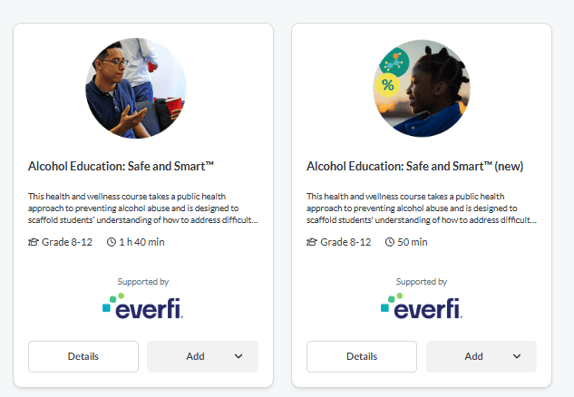
- (Optional) Review the Curriculum Guide, Standards Alignment document, and Educator One‑Pager.
- If you are looking to add this course and do not currently have students taking the legacy course you can create a new class or add to an existing class using the new course.
- Share the new class code with your students.
- Keep any students already working in the current course there until they finish.
Data, Grades, and Reporting
- All grades and student work in the current course remain available through the end of the school year.
- After June 30, while the legacy course will no longer be available, teachers will still be able to access prior grades.
- Usage will be monitored on both versions. Data will not be merged if both versions are explored.
FAQ
Why is this course changing?
To improve accessibility, update the student experience, and reflect current health standards while keeping core learning goals intact.
Will this affect my current classes?
No. Active classes continue as normal. You decide when to begin using the refreshed course.
What if my district requires a review process?
We support districts with formal review requirements and can handle needs on a case‑by‑case basis.
When will the old course be removed?
The legacy course retires on June 30, 2026. Grades will still be available.