
We’ve introduced updates that make it easier for teachers to add students, view progress, and navigate Homeroom with the most current Everfi branding. Here’s what you’ll notice:
Batch Add Students
Updated Email Validation Message
- This ensures teachers using batch uploads see accurate, relevant guidance.
Improved Batch Upload Workflow
- CSV upload remains available for non‑rostered classes.
- Teachers get clearer feedback when reviewing student email conflicts.
New Teacher Dashboard
Optimized Class & Progress Summaries
- Enrollments that include only teacher‑simulated activity now count toward “In Progress” summaries.
- These updates improve accuracy on:
- Class Details → Course (cohort) Cards
- Grades & Progress
Add Student Modal
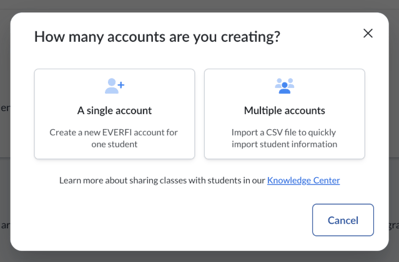
New “Add Student” Experience
- A new modal now guides teachers through adding students.
- Teachers can choose between:
- Single Student Creation
- Bulk Student Creation (CSV upload)
This unifies student‑add actions into one clear workflow.
Admin Dashboard Branding
Updated Everfi Logo
-
The Homeroom admin dashboard now displays the current Everfi logo, bringing the experience in line with our updated brand system.
Why These Matter
These updates make Homeroom easier to use, more accurate, and more aligned with our brand standards. Teachers benefit from clearer workflows, reliable progress data, and improved student‑add options.