
We’ve released updates that improve accessibility, visibility, account access, and day‑to‑day teaching workflows across Homeroom. Since both releases rolled out together, here’s what you’ll notice—clearly organized by release.
2026.05 Updates
Login & Account Access: Accessibility Enhancements
Teachers and users will experience improved accessibility when working with login, password, and account‑related screens. Screen reader announcements are clearer, form validation is easier to navigate, and focus now moves directly to fields that need attention. These improvements help ensure account‑related tasks are accessible and easier to complete for all users.
Teacher Dashboard: New Featured and Recent Courses
The My Courses experience has been updated to make it easier for teachers to find and return to the content they use most.
Teachers will now see a Featured section at the top of the page, followed by a Recent section that displays up to three courses most recently added to a class. Recommended courses continue to appear below, helping teachers quickly discover relevant content.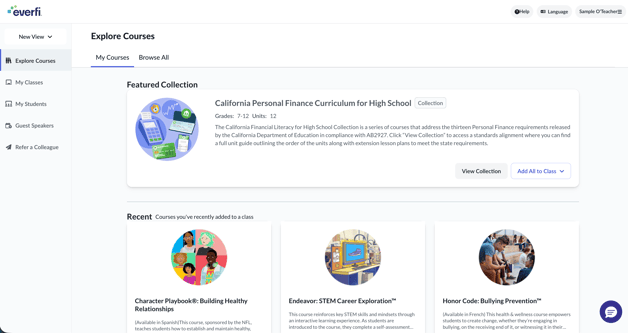
Grades & Progress: Clearer Indicators for Simulated Scores
The gradebook now includes an asterisk next to simulated scores entered by teachers. This visual indicator helps distinguish simulated scores from earned scores when reviewing student performance in the gradebook and student grade details.
Guest Speaker Requests: Improved Scheduling Experience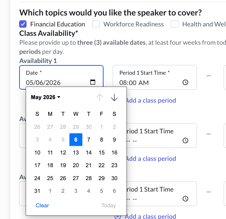
When requesting a guest speaker, the date picker now opens to the first available date instead of today’s date. Teachers are also prevented from selecting unavailable dates or dates outside the implementation period, making scheduling faster and more intuitive.
Accessibility: Additional Teacher‑Facing Improvements
This release also includes several accessibility enhancements across teacher workflows. Updates improve how screen readers interpret form labels, validation errors, and instructional text, supporting a more consistent and inclusive experience when creating classes, completing forms, and managing settings.
2026.06 Updates
Teacher Dashboard: New Dashboard Experience for Newly Registered Teachers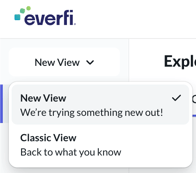
Newly registered teachers will now see the updated teacher dashboard by default. This refreshed experience focuses on improved organization, clarity, and ease of navigation.
Teachers can still switch back to the Classic dashboard at any time, and existing teacher accounts are not affected by this change yet.
Student Login Access: Clearer Error Messaging for SSO Login Issues
When students are unable to log in using single sign‑on (SSO), such as Clever or ClassLink, error messages are now more descriptive and easier to understand. These updates help students and teachers quickly identify next steps, reducing confusion when access issues occur.
Accessibility: Continued Accessibility Enhancements
Ongoing accessibility improvements were made across Homeroom as part of this release. These updates support a more inclusive experience when logging in, navigating accounts, and working within teacher tools.
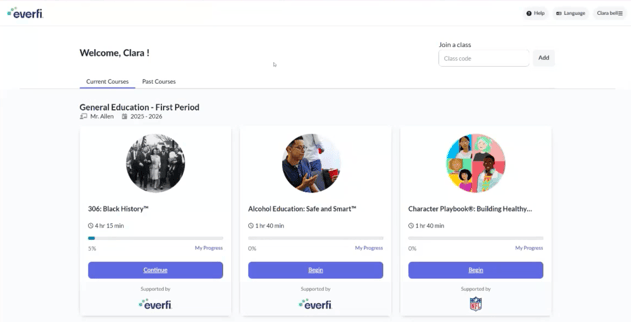
Student Experience: Early preview of a new student dashboard
Why This Matters
Together, these updates focus on making Homeroom more accessible, intuitive, and dependable for teachers. By improving course discovery, clarifying grade data, simplifying scheduling, strengthening login experiences, and continuing accessibility enhancements, Homeroom supports smoother classroom management and a more inclusive teaching experience.