
This release includes updates that improve course discovery, student management, gradebook accuracy, student opportunities, and accessibility across Homeroom. These changes focus on helping teachers work more efficiently while continuing to support an inclusive and reliable classroom experience.
New Teacher Dashboard: Student Opportunities on Course Cards
Some courses may offer optional student opportunities, such as recognition or special programs tied to course participation.
Teachers exploring courses will now see an Opportunities label on course cards when these student opportunities are available at their school. Selecting the label opens the Course Details page, where teachers can learn more about what’s available for students.
This update is designed to help teachers quickly identify courses that include additional student opportunities without changing how courses are assigned or taught.
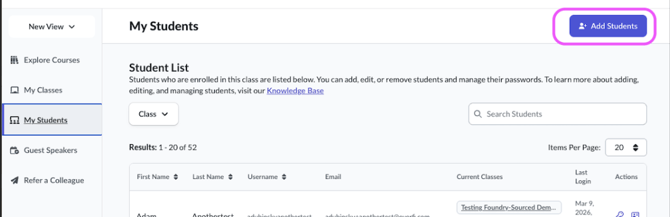
Student Management: Add Students from My Students
Managing students is now more flexible for teachers who create and manage non‑rostered classes.
Teachers can add students directly from the My Students page, either by:
- adding individual students, or
- uploading students in bulk using a CSV file
This update reduces the need to navigate between pages and streamlines common classroom setup tasks.
Grades & Progress: Improved Accuracy for Enrollment Status and Scores
Several behind‑the‑scenes improvements help ensure gradebook data stays accurate and consistent.
Teachers will see more reliable enrollment statuses when students move between classes or when teachers simulate assessment scores. In addition, simulated assessment behavior now updates student progress more predictably, helping teachers confidently interpret Grades & Progress data.
Grades & Progress: Expanded Student Recognition for Sponsors
Teachers and students can now more easily share appreciation for organizations that support classroom learning.
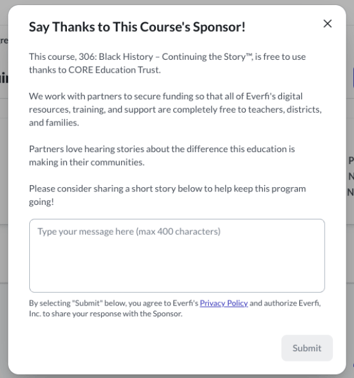
The Thank a Sponsor feature is now available across all cohorts, allowing teachers to help students recognize the organizations that make certain learning experiences possible. This feature is optional and does not affect course progress, grading, or instruction.
Teacher Emails: Optional End‑of‑Day Achievement Summaries
Homeroom now supports an optional end‑of‑day email summary for teachers when students earn certain achievements.
This capability is configured on the backend and may not be enabled for all schools. When enabled, teachers receive a single, consolidated email on days when qualifying achievements are earned, rather than multiple individual messages.
This update helps introduce teacher email communication in Homeroom while keeping notifications intentional and low‑volume.
Student Dashboard: Clearer Past Courses Experience
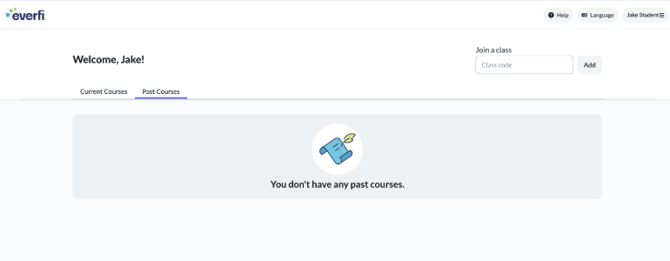
Students without past‑year enrollments will now see a clearer experience when reviewing their dashboard.
When a student does not have any courses from a previous school year, the Past Courses tab now displays an empty state instead of appearing blank. This helps set expectations and reduces confusion when navigating student dashboards.
Accessibility: Continued Enhancements Across Teacher Workflows
This release includes additional accessibility improvements across Homeroom.
Updates improve how screen readers announce form labels, validation messages, buttons, and instructional text when teachers:
- manage students
- explore courses
- review grades
- complete common dashboard actions
These updates support a more consistent and inclusive experience for all users.
Why This Matters
Together, these updates make Homeroom more intuitive, reliable, and accessible for teachers and students. By improving incentive visibility, simplifying student management, strengthening gradebook accuracy, refining the student dashboard, and continuing accessibility enhancements, Homeroom supports smoother classroom workflows and clearer day‑to‑day teaching experiences.