
In this release, we’ve made several improvements to support class setup, streamline progress review, and create a more consistent experience for both teachers and students.
Teacher Experience Updates
Review Archived Class Data with Confidence
You can now more easily access information from previous school year classes when you need to reference past student progress. Archived classes now display student progress, gradebook data, and student lists as expected, giving you full visibility into prior class performance.
Why this matters: You can quickly reference past student work and performance without needing to recreate classes or search for missing data.
Clearer Rollover Experience for New School Year Setup
We’ve improved how older class groups are handled during the rollover process to make start‑of‑year setup more straightforward. Legacy course groups from previous school years are now clearly separated and labeled as “Sunset.” These groups remain tied to the past school year and are no longer available for reuse when setting up new classes.
Why this matters: You can focus on current classes during setup and avoid confusion about which classes are active for the new school year.
More Complete View of Student Work in the Gradebook
Student responses to reflection and short‑answer questions are now more consistently visible within the Gradebook. Updates to how response data is surfaced help ensure written responses—such as reflections—appear alongside other student progress data when reviewing a class.
Why this matters: You can review all student work in one place, including written responses, without switching between different views.
More Streamlined Class Creation and Editing
Creating and updating classes is now a smoother experience. Improvements to the class setup process help prevent duplicate enrollments and reduce the likelihood of encountering errors when building or editing classes.
Why this matters: You can set up classes more efficiently and spend less time troubleshooting issues during class creation.
Additional Guidance When Managing Course Access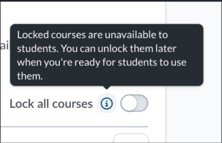
You’ll now see more context when locking or unlocking courses within a class. A tooltip has been added to the “lock/unlock all courses” setting, providing a quick explanation of how this action impacts student access.
More Relevant Course Recommendations
Finding courses to assign is more intuitive when browsing content. When sponsored recommendations are not available, the Explore Courses page now displays suggested curricula based on your selected grade levels and subject areas.
Why this matters: You can more quickly find relevant courses and spend less time searching for content to assign.
Easier Search Within Student Details
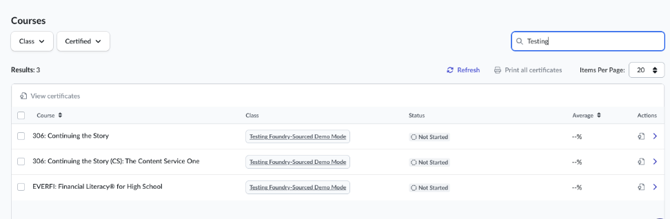
You can now find specific enrollments more efficiently when reviewing individual students. The search bar on the Student Details page now supports searching by both course name and class name (matching from the beginning of the search term).
Why this matters: You can locate specific enrollments faster when reviewing student progress or answering questions.
Student Experience Updates
Improved Navigation for Larger Course Lists
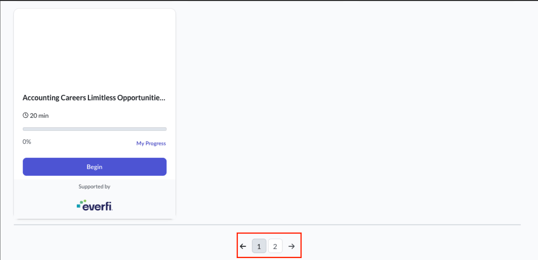
Students can now more easily manage and navigate their course lists. The Current Courses section includes pagination and options to adjust how many courses are displayed at once, making it easier to access all enrollments.
Why this matters: Students can stay organized and easily find their courses, even when enrolled in many classes.
Clearer Course Completion Indicators
Course progress now more clearly reflects when key milestones have been reached. When students meet certification requirements—such as completing required assessments—their course will display as complete, even if optional activities remain.
Why this matters: Students and teachers can quickly confirm when required learning activities are finished, reducing confusion about completion status.
More Context on Opportunities
Students now have more visibility into the organizations behind available opportunities. Opportunity cards include sponsor names and logos, providing additional context directly within the dashboard.
More Seamless Notification Experience
Notifications are now better aligned with where students are in the platform. Login-related notifications will no longer appear while a student is actively working within a course, helping reduce interruptions.
Accessibility Updates
We’ve made several improvements to support accessibility and usability across the platform. These updates include improved labeling for screen readers, clearer dialog interactions, better table descriptions, and improved readability at higher zoom levels.
Why this matters: This helps ensure all users can navigate and interact with the platform more easily and consistently.