
In this release, we've made several improvements to streamline student management, improve visibility into student activity, strengthen account security, and enhance the overall experience for both teachers and students.
Teacher Experience Updates
Easier Student Search
You can now search for students using their username, first name, or last name when viewing student lists.
Why this matters: You can find students more quickly, especially when multiple students share similar names.
Better Visibility Into Student Activity
Student Profile pages now include each student's most recent login date. We've also updated enrollment status labels and visual indicators to provide a more consistent experience.
Why this matters: You can more easily monitor student engagement and quickly identify students who may need additional support.
Improved Gradebook Organization
The Gradebook now sorts students by last name first, with first name used as a secondary sort when needed.
Why this matters: Student records appear in a more familiar and organized format, making it easier to review progress and locate specific students.
Clearer Management of Archived Classes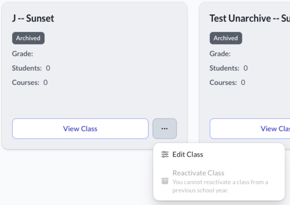
Archived classes from previous school years can no longer be reactivated through the archive workflow. Teachers should continue using the class renewal process when preparing classes for a new school year.
Why this matters: This helps prevent accidental use of classes from prior school years and supports a cleaner rollover experience.
Improved Class and Student Management
We've made several refinements to class details pages, student lists, and student profile pages, including navigation and performance improvements.
Why this matters: You can more easily move between classes and student records while enjoying a smoother, more reliable experience.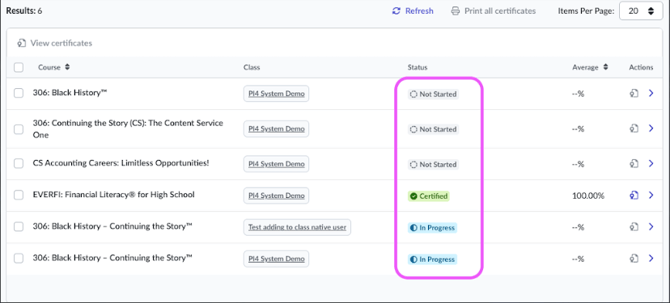
More Reliable Progress Reporting
We've resolved an issue that could prevent teachers from viewing course progress and assessment data for certain courses.
Why this matters: You can more confidently monitor student progress and access the information you need to support learning.
Student Experience Updates
Improved Opportunities Experience
Opportunity information now displays more consistently when opportunities are connected to multiple courses. Students will also see available opportunities correctly across eligible courses.
Why this matters: Students have a more complete view of available incentives and opportunities related to their learning.
Access All Earned Certificates
Students can now download certificates earned from previous or inactive classes.
Why this matters: Important achievements remain accessible even after a class has ended.
Enhanced Digital Badge Downloads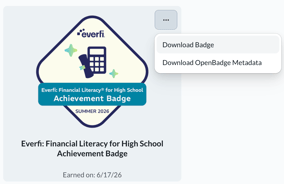
Students who earn digital badges can now download them as either a PNG image file or a JSON file compatible with Open Badges standards.
Why this matters: Students have additional options for sharing achievements and importing credentials into compatible badge and portfolio platforms.
Clearer Google Sign-In Status
Students who have connected their Google account will now see confirmation that Google Sign-In is linked to their account.
Why this matters: Students can easily verify which sign-in methods are available for their account.
Improved Course Player Experience
We've removed an outdated browser-size warning that could appear when a course window was resized.
Why this matters: Students can learn on a wider range of screen sizes without unnecessary interruptions.
General Improvements
Improved Account Security During Password Resets
When a teacher or student resets their password, all active sessions will now be signed out automatically.
Why this matters: This provides an additional layer of account security by ensuring previous sessions and devices are no longer connected after a password change.
Easier Language Selection
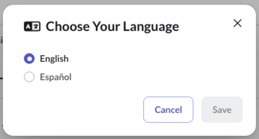
Language options throughout the platform now display each language using its native name.
Why this matters: Users can more easily identify and select their preferred language.
Accessibility Updates
We've made several accessibility and usability improvements across teacher and student experiences. These updates support improved navigation, zoom usability, form validation messaging, page responsiveness, and screen reader interactions.
Why this matters: These enhancements help create a more consistent and accessible experience for all users.