
This release includes updates that simplify course requests, improve navigation, and make registration and progress tracking easier for teachers and students.
Clearer Student Age Range Options
Student registration age ranges have been updated for clarity. The age range previously listed as "Between 13 and 18" is now displayed as "13 to 17." Age range translations have also been updated to ensure consistency across supported languages. This change helps students and families more easily identify the correct age range during registration without confusion about overlapping options.
Privacy Information Added to the Profile Menu
Teachers and students can now access important privacy resources directly from the Profile menu. New links include: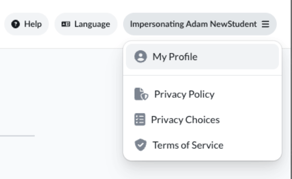
- Privacy Policy
- Privacy Choices
- Terms of Service
These updates make it easier to find account and privacy information when you need it.
Streamlined Course Requests
Requesting a new course now takes fewer steps. Teachers no longer need to complete an additional form explaining why they are requesting a course. Requests can now be submitted directly from the course catalog, creating a faster and more streamlined experience.
Improved Gradebook Experience
Several improvements have been made to the Gradebook to help teachers review student performance more efficiently. Updates include:
- Improved color contrast in progress and grade visualizations
- Clearer status indicators and score displays
- Enhanced post-assessment results views that make it easier to distinguish student responses from correct answers
- More consistent styling across student performance and progress pages
These changes make it easier to quickly review student progress and assessment results.
Improved Guest Speaker Request Form
The Guest Speaker request form has been updated with layout and spacing improvements that create a cleaner, more user-friendly experience. These updates make scheduling guest speakers easier to navigate and complete.
More Relevant Opportunities for Students
Students will now see a more accurate view of available opportunities. Updates to the Opportunities experience help ensure students only see opportunities that are relevant to their enrollments, making it easier to focus on opportunities available to them.
Easier Dashboard Navigation
Students can now return to their dashboard home page by selecting the Everfi logo in the navigation header. This provides a faster and more intuitive way to return to Current Courses from anywhere within the student dashboard.