
This release includes updates designed to make everyday classroom management easier, especially when reviewing student progress and navigating large classes. We've also resolved several issues affecting Clever and ClassLink users and continued improving accessibility across the platform.
Keep Student Information Visible While Reviewing Grades
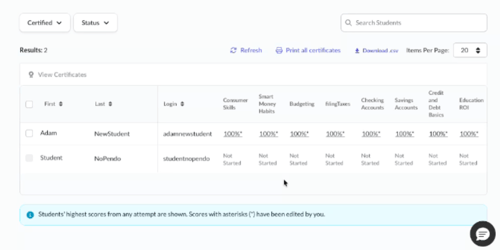
When reviewing student progress, especially in courses with many lessons or assessments, it can be difficult to keep track of which student's data you're viewing as you scroll across the Gradebook. This update makes navigating large gradebooks much easier by keeping student information in view while you work.
What changed: Student first and last names remain visible as you scroll horizontally through the Gradebook, making it easier to review progress, scores, and assessment data across courses with many lessons and modules.
Why it matters: You can review student performance more efficiently without needing to continually scroll back to identify the correct student.
Clearer Course Counts in Class Details
Teachers using collections may have noticed that the number of courses displayed in a class didn't always match what appeared in the course list. This occurred because collections grouped multiple courses into a single card, creating confusion about how content was being counted.
What changed: The Courses tab on the Class Details page no longer displays a separate results count that could be misleading when collections contained multiple courses. The existing course count remains available and provides a more accurate view of classroom content.
Why it matters: You'll see more consistent course totals, especially in classes that include collections.
Improved Access for Clever and ClassLink Teachers
We've made several improvements for teachers who use Clever or ClassLink integrations. These updates address issues that could prevent some teachers from accessing schools, rosters, or related integration features after account changes.
What changed: Teachers who previously registered through a non-integrated school and later joined a Clever or ClassLink-integrated school can now access their synced schools and related features more reliably. We also fixed an issue that could prevent some ClassLink users from accessing their rostered classes and ClassLink-related functionality.
Why it matters: Teachers moving between schools or working with integrated rostering systems should experience fewer access and roster visibility issues.
Better Course Availability Indicators
We've updated course previews to more accurately reflect content availability. Teachers will no longer be presented with preview options for content that isn't yet available for classroom use.
What changed: Course Preview and Lesson Preview options are no longer displayed for courses marked as Coming Soon.
Why it matters: This helps set clearer expectations about which content is currently available for use and preview.
Improved Teacher Achievement Notifications
Keeping track of student accomplishments is an important part of celebrating progress and encouraging engagement. This update helps make those achievements more visible to teachers.
What changed: Student achievement awards can now be included in teacher daily digest notifications when those awards are configured to send teacher updates.
Why it matters: You'll have better visibility into student achievements without needing to actively monitor multiple locations within the platform.
Accessibility Improvements
We're continuing to improve the Homeroom experience for users who rely on assistive technologies. This release includes updates that make important platform notifications clearer and easier to understand.
What changed: Success messages related to copying class codes and entering registration codes are now announced correctly by screen readers without being repeated multiple times.
Why it matters: These improvements create a more consistent and user-friendly experience for screen reader users.