
This release includes updates designed to make teaching materials easier to find, simplify Gradebook workflows, and improve access to certificates and opportunities. Teachers and students will also see improvements to language preferences, sign-in messaging, and class creation.
Find Teaching Resources More Easily
Teaching materials are now organized based on whether they apply to a specific lesson or the entire course, helping you find resources closer to where you will use them.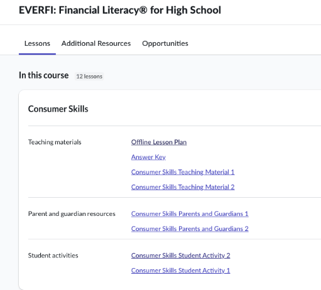
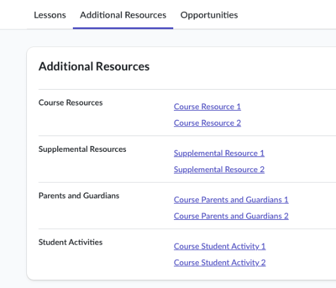
What changed: Lesson-specific resources now appear directly on the applicable lesson card, including teaching materials, parent and guardian resources, and student activities. Course-wide materials continue to appear under Additional Resources. The separate Student Activities tab has been removed.
Why it matters: You can spend less time searching across different sections of a course and more time preparing materials for instruction.
Open Courses in Your Selected Language
Courses and lessons now open more consistently in the language selected on your dashboard.
What changed: We resolved an issue that could cause courses and lessons to open in English even when another dashboard language was selected. This update applies when students launch courses and when teachers preview courses or lessons.
Why it matters: Teachers and students can more reliably access available course content in their selected language.
Move Directly From a Class Gradebook to the Global Gradebook
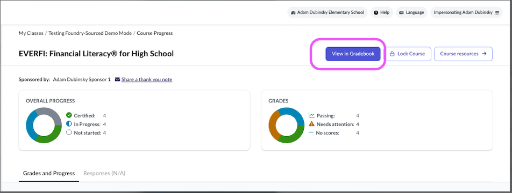
You can now move from a class-level view to the Global Gradebook without searching for the same class and course again.
What changed: A new View in Gradebook button has been added to class gradebook pages. Selecting the button opens the Global Gradebook with the current class and course already selected as filters.
Why it matters: You can move between detailed and broader Gradebook views more efficiently while keeping your focus on the same class and course.
Print Certificates From the Global Gradebook
Certificate actions are now available directly from the Global Gradebook, making it easier to manage certificates for multiple students.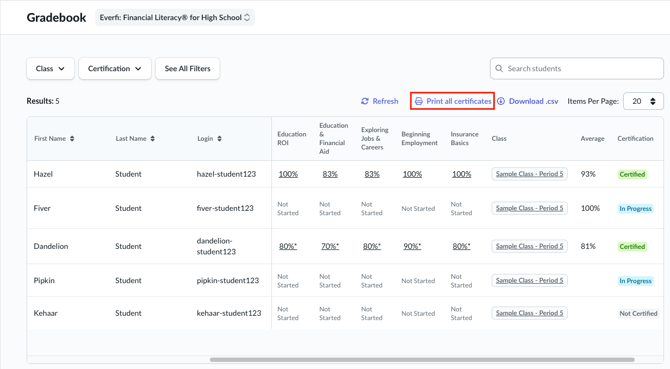
What changed: The Global Gradebook now includes a Print All Certificates action for certified enrollments and a Print Certificate action for individual students. The table also includes Class and Average columns.
Why it matters: You can print or save certificates from one location and review each student’s class and average score without opening individual enrollment records.
Access Opportunities From the Main Navigation
Opportunities are now easier to locate within the teacher dashboard.
What changed: Opportunities has moved from within Explore Courses to the main navigation on the left side of the dashboard. Opportunity cards have also been updated to display the logo associated with the opportunity’s sponsor.
Why it matters: You can browse available opportunities more directly and more easily identify the organization sponsoring each opportunity.
Review More Helpful ClassLink Sign-In Messages
Sign-in messages now provide clearer information when certain ClassLink users cannot access Homeroom.
What changed: Affected users will now see a descriptive message on the login page instead of a generic error page.
Why it matters: Clearer information can help users understand that a sign-in issue occurred and make troubleshooting less confusing.