This release includes updates designed to make course collections easier to explore, provide more flexibility when reviewing student performance, and simplify common class management tasks. Teachers will also see clearer Gradebook guidance and easier access to student records, while students will benefit from updated course cards and more information about their achievements.
Browse Featured Collections More Easily
Featured collections have been updated to make available content easier to scan and compare.
What changed: Collection cards now display a shorter preview of each collection instead of the full description found on the collection details page. If more than one featured collection is available at your school, you may now see up to three collection cards displayed together. On smaller screens, the cards are stacked for easier viewing.
Why it matters: You can review more of your school's available collections at a glance and quickly decide which collections you want to explore further.
Expanded Gradebook Sorting Options
Additional sorting options give you more flexibility when reviewing student progress and performance.
What changed: You can now sort students in the Gradebook by their progress in individual modules and their post-assessment scores. These additional sorting options provide new ways to organize Gradebook data based on the information most relevant to your review.
Why it matters: You can quickly identify learning trends, review performance more efficiently, and focus on the students who may need additional attention or support.
Improved Gradebook Navigation
Gradebook filters and messages now provide clearer information about the results you are viewing.
What changed: The visibility filter in the Global Gradebook and Class Gradebook is now labeled Show Only Removed Students. When selected, the filter displays only removed student records. We've also updated Gradebook messaging so that when a filter combination does not return results, you will see clearer guidance explaining that your current selections returned no results and may need to be adjusted.
Why it matters: You can more easily understand which student records are included in your results and more quickly determine how to adjust filters when the information you're looking for is not displayed.
Improved Student and Class Management
We've updated student and class management workflows to provide a more consistent experience when enrollment changes occur.
What changed: Enhancements to class management workflows improve how student records are handled during class changes. Teachers can also once again use the Change Classes action for students who sign in with Google. Students connected through Clever or ClassLink continue to have class membership managed through their school's roster sync.
Why it matters: You can manage student enrollment and class assignment changes more efficiently while maintaining continuity across student records throughout the school year.
Streamlined Class Creation
The class creation workflow now provides additional safeguards during setup.
What changed: After you select Create, the button remains unavailable until the class has been created. This helps ensure the original request is processed before another request can be submitted.
Why it matters: The class setup experience is more predictable and helps reduce the need for follow-up cleanup after creating new classes.
Faster Access to Course Grades
You can now move more directly from a student's profile to the corresponding course grades.
What changed: The action on the student's Courses tab is now labeled View Course Grades. Selecting it takes you directly to the student's grade details for that specific enrollment instead of opening the full class Gradebook.
Why it matters: You can review course-specific performance information more quickly and spend less time navigating between pages.
Filter Student Records by School Year
Student profiles now include additional tools for reviewing enrollments across school years.
What changed: The Courses tab on a student's profile now includes a School Year column and filter. Records automatically default to the current school year while still allowing you to review enrollments from previous years.
Why it matters: It's easier to distinguish current coursework from historical records and quickly locate the enrollment information you're looking for.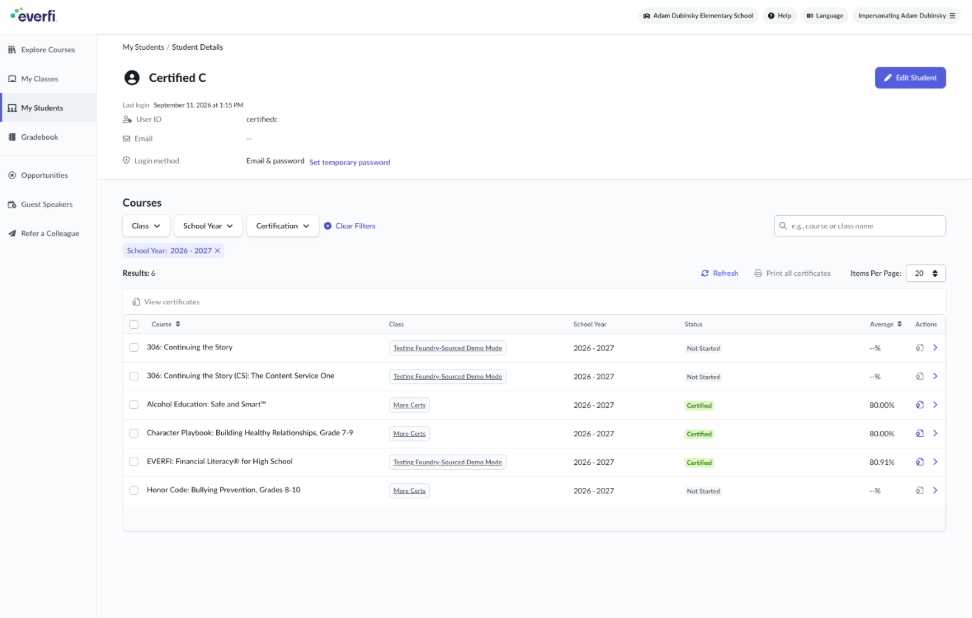
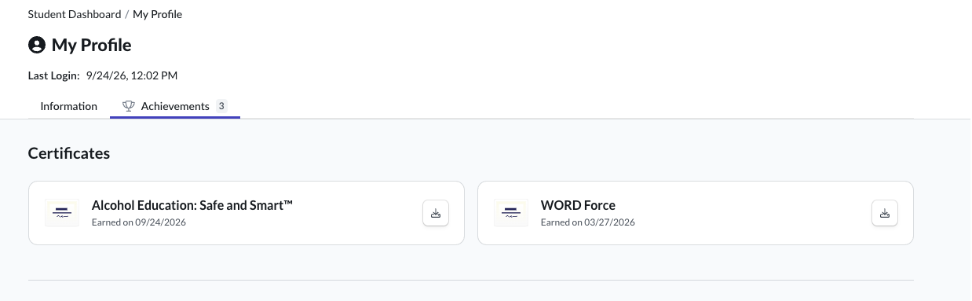
View When Certificates Were Earned
Students now have additional visibility into their accomplishments.
What changed: Certificate cards on the Achievements page now display the date each certificate was earned. Certificates are also organized with the most recently earned achievement appearing first.
Why it matters: Students can more easily track achievements, identify recently earned certificates, and celebrate their progress.
Navigate Courses With Updated Course Cards
Course cards on the student dashboard have been refreshed to provide a cleaner and more intuitive experience.
What changed: Longer course titles can now wrap to a second line instead of being cut off. Courses that have not been started now display Start instead of Begin, and the Continue button includes a directional arrow. Additional updates to card styling, spacing, and pagination create a more consistent browsing experience.
Why it matters: Students can more easily browse available courses, understand their next action, and navigate their learning experience with greater clarity.
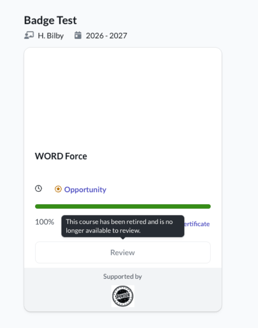
Review Clearer Information About Retired Courses
Students will now receive clearer guidance when interacting with courses that are no longer available.
What changed: If an older course has been retired, the Review button is no longer active. Students will instead see messaging indicating that the course has been retired and is no longer available for review.
Why it matters: Clearer messaging helps students understand why older content may no longer be accessible and reduces confusion when reviewing past coursework.