
This release includes updates designed to give teachers more useful course information, make Gradebook downloads better reflect their selected view, and provide clearer handling of grades from previous school years. Teachers who use Clever will also see improvements when moving between schools.
View Learning Objectives on Lesson Cards
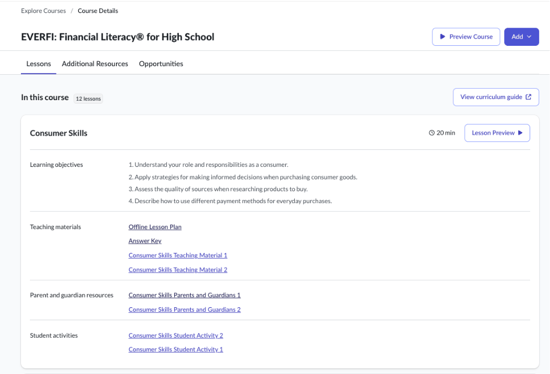
Course details pages can now display learning objectives for individual lessons, giving you more information about what students will learn before you add or preview a course.
What changed: When learning objectives are available for a course, they appear directly on the corresponding lesson cards. Because learning objectives are configured within each course, they will become available gradually as individual courses are updated and released.
Why it matters: You can review the purpose and focus of each lesson while exploring a course, helping you determine how the content may fit your instructional goals.
Download Gradebook Data Using Your Selected Filters
Gradebook CSV downloads now better align with the information displayed on the page.
What changed: When you download a CSV from the Global Gradebook or a class Gradebook, the file reflects the filters you have applied. Depending on the Gradebook view, these may include school year, class, student visibility, and certification status. Pagination does not limit the downloaded results.
Why it matters: You can create more focused reports without downloading the full data set and removing unrelated records manually.
Review Grades From Previous School Years
Gradebook controls now provide clearer handling of legacy courses from previous school years.
What changed: If a legacy course belongs to a class from a past school year and the annual rollover period has ended, you can open the score window to review existing information, but you cannot add or change scores. Grade editing remains available for legacy courses in the current school year and during the rollover period for classes from the previous school year.
Why it matters: This helps preserve historical Gradebook records while allowing you to continue managing current coursework and grade information during the appropriate rollover window.
Improved School Access for Clever Teachers
Teachers whose school assignments change through Clever will now be directed to a school where they currently teach.
What changed: If Clever moves you to a new school and your previously selected school is no longer associated with your account, Homeroom automatically updates your selected school. If you continue teaching at more than one school, you can use the school selector to move between your available schools.
Why it matters: You can access your current school and classes more easily after roster updates or school assignment changes.