
When to use this
Use this information if a student reports seeing the same course more than once on their dashboard. Duplicate courses usually appear when the same course is assigned through more than one class.
Why duplicate courses appear
A student may see the same course more than once if:
- Multiple classes include the same course
- More than one teacher assigns the same course to the student
- A student is enrolled in overlapping classes that use identical content
Each instance of the course is tied to a specific class.
How to identify where each course came from
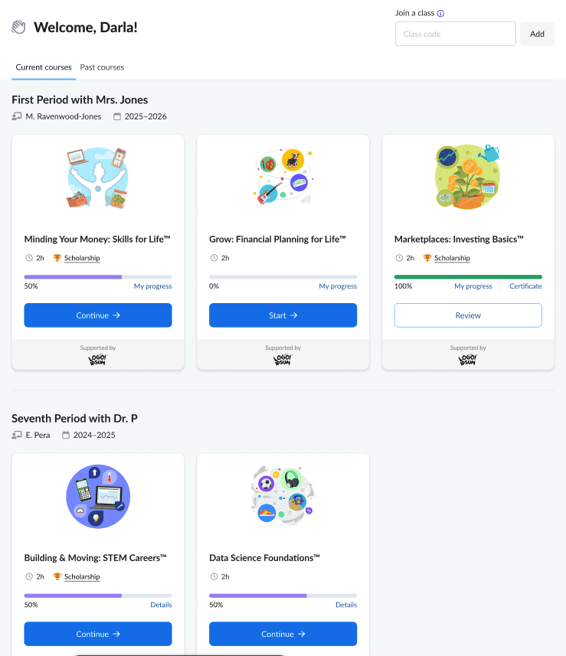
On the student dashboard, courses are organized by class.
Each group shows:
- The class name
- The teacher who assigned the course
- The school year
This makes it easy to confirm whether duplicate courses are coming from different classes or teachers.
What you can do next
After confirming the source of the duplicate:
-
If the student should only be in one class
Remove the student from the class they shouldn’t be enrolled in. -
If both classes legitimately use the same course
Let the student know which class or course instance they should complete first. -
If you’re unsure why the course was assigned more than once
Check with co‑teachers or department staff who may have created overlapping classes or assignments.
If you need to review student enrollments
You can also review a student’s classes from your dashboard:
- Go to My Students
- Open Student Details
- Review the list of classes and enrolled courses
This can help confirm how and when the course was assigned.
Related articles
- Managing Students