
When to use this
Use this workflow when you need to review student progress or completion data from a previous school year.
In the New Teacher Experience, data from prior years is accessed at the class level, rather than from a separate Gradebook view.
How access to past data works
Classes are organized by school year. When a new school year begins, classes from the previous year are archived but remain available for review.
To access data from a past school year, you first locate the correct class, then view course‑level information from within that class.
This approach is the same for:
- Teachers using single sign‑on (Clever or ClassLink)
- Teachers using standard login
- Teachers with automatically archived classes from previous years
How to view classes from a previous school year
- Go to My Classes.
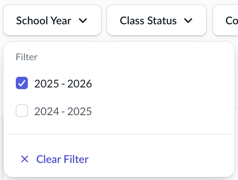
- Use the School Year filter to select a previous school year.
- Review the list of classes from that year, including archived classes.
- Select View Class on the class you want to review.
Viewing student progress and grades
From a class:
- Open the class.
- Locate the course you want to review.
- Select View Grades for that course.
From here, you can review available student completion and score data associated with that class and course.
Important notes about past data
- Access to past data is limited to prior school years.
- Teachers may not be able to modify past classes or reissue items from previous years.
- Availability of specific data may vary depending on the course and the school year.
About certificates from prior school years
Certificates from previous school years cannot be reissued by teachers.
If a student needs a certificate from a prior year, they should log in to their own account and download it from their dashboard.
Requesting older data
If you need access to data from more than one prior school year, contact Everfi Support.
Be prepared to include:
- The school year you’re requesting data from
- The class name
- The course or curriculum name
The support team will review whether older data can be retrieved.