
When to use this
If you don’t see a class you expect, it may have been archived. Archiving removes a class from your active view and from student dashboards while keeping the class available during the current school year.
If you previously used the option to hide a class, that action is now called archiving in the New Teacher Experience.
What happens when you archive a class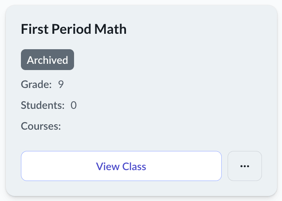
When a class is archived:
- The class is removed from your default My Classes view
- The class is removed from students’ dashboards
- The class is labeled Archived on the class tile
- The class can be viewed again using filters during the current school year
In most cases, classes are archived directly by the teacher—either intentionally or by mistake—and can be restored during the same school year.
Archiving is helpful when a class was created by mistake or is no longer needed.
Before you archive, consider locking courses instead
If you want to keep the class but temporarily hide one or more courses, locking courses may be a better option than archiving the entire class.
- Archive a class
Removes the entire class and all courses from student access - Lock a course
Keeps the class active while hiding individual courses from students
For more control over course visibility, see Locking and Unlocking Courses.
How to archive a class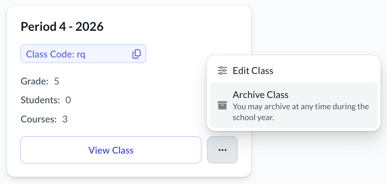
- Click My Classes in the left navigation.
- Locate the class you want to archive.
- Click the three‑dot menu on the class card.
- Select Archive Class.
The class is marked as Archived and removed from your active class list.
How to view archived classes
You can view archived classes at any time during the current school year.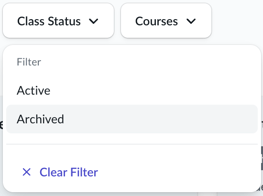
- Go to My Classes.
- Use the Class Status filter.
- Select Archived to view archived classes or Active to return to your current classes.
Archived classes remain visible when filtered and are clearly labeled.
About the new school year
At the start of a new school year, Everfi automatically archives classes from the previous implementation period.
- These automatically archived classes may be available to restore for a short time at the beginning of the school year.
- After that window closes, they can no longer be unarchived.
If you’re unsure whether a class was archived by you or automatically archived during a new school year, contact the Everfi Support team for help.
Related articles
- Locking and Unlocking Courses
Use this option to manage course visibility without archiving an entire class. - Preparing for the School Year in Everfi
Information about what happens to classes once the past implementation period (school year) ends and the new one begins.