
What course certifications are
All Everfi courses include a certificate of completion.
A certificate becomes available when a student completes all required course content and reaches a Certified status. Certificates are generated as PDF files and confirm successful course completion.
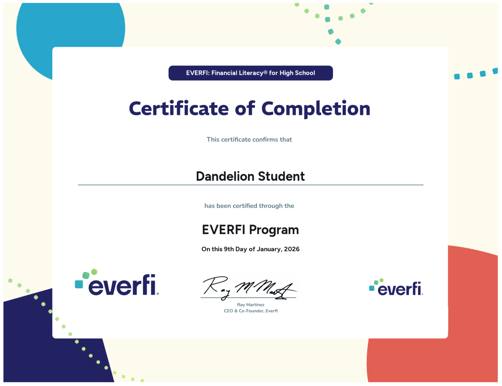
Where learners access their certificates
When a learner completes a course, their certificate becomes available on the Learner Dashboard.
Learners can:
- View their certificate
- Download a PDF copy
- Save or print the certificate for their records
If a student has completed a course but does not see a certificate, they should contact Support and include the course name.
Where teachers access student certificates
Teachers can access student certificate information in either the class gradebook or the Global Gradebook.
Option 1: Grades and Progress
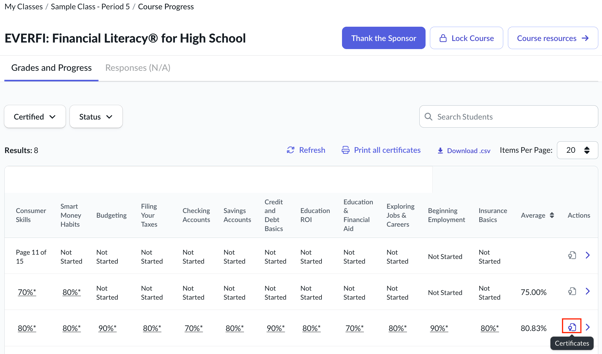
To access certificates for a specific class:
- Go to My Classes
- Select the class
- Select the course
- Open Grades and Progress
This view shows certificate availability for students enrolled in the selected class and course.
Option 2: Global Gradebook
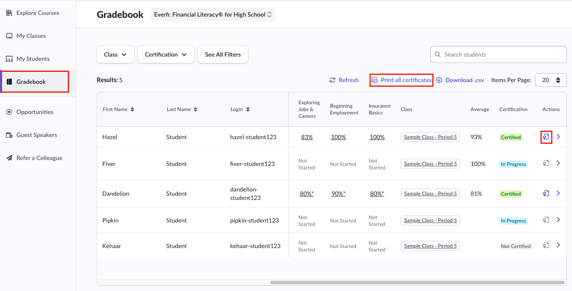
Teachers can also access certificate information from the Global Gradebook.
The Global Gradebook allows teachers to:
- View student enrollments across all of their classes for a selected curriculum
- View certification status
- Print individual certificates
- Print certificates in bulk for eligible students
When certificates are available
Teachers can access certificates only for students who have reached a Certified status.
Certificates are not available for:
- Students who have not completed the course
- Students who are still in progress
- Archived classes or past implementation periods
Printing certificates
Teachers can print certificates for students who have reached Certified status.
Certificates can be:
Printed individually from the class gradebook or Global Gradebook
Printed in bulk from the Global Gradebook using Print All Certificates
Things to Keep in Mind
- Certificates are available only after a student reaches Certified status.
- Students can download their own certificates from the Learner Dashboard.
- Teachers can access certificate information from either the class gradebook or the Global Gradebook.
- The Global Gradebook allows teachers to print certificates individually or in bulk.
- Certificate availability is tied to certification status and course completion.
For step-by-step instructions, see: Printing Student Certificates