
What pre‑assessments measure
Pre‑assessments measure a student’s prior knowledge before they begin course content.
Pre‑assessment scores:
- Are completed before instruction starts
- Do not affect certification
- Help provide insight into what students already know
These scores are informational and are not used to determine course completion.
Where pre‑assessment scores appear
Pre‑assessment scores are viewed in Grades and Progress for a specific class and course.
To access Grades and Progress:
- Go to My Classes
- Select the class
- Click View Grades
How to view a student’s pre‑assessment score
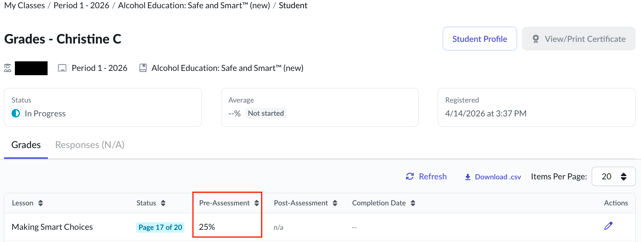
To view a pre‑assessment score:
- Open Grades and Progress for the class and course
- Locate the student in the table
- Select the assessment score to view details
- Review the Pre‑Assessment score shown in the student’s assessment details
Pre‑assessment results appear separately from post‑assessment scores.
Understanding pre‑assessment results
It’s common for pre‑assessment scores to be:
- Lower than post‑assessment scores
- Incomplete or missing if a student did not finish the assessment
This does not indicate a problem with the student’s progress.
Use pre‑assessment results as a reference point, not as a grading measure.
Things to keep in mind
- Pre‑assessments do not impact certification
- Certification is based on post‑assessment completion
- Pre‑assessment scores are informational only
If you’re troubleshooting missing or unexpected results, confirm that the student completed the pre‑assessment before starting the course.
Related articles
You may also want to review: