
How course access works
Your teacher decides which Everfi courses you need to complete.
When a course is assigned, it will appear in your dashboard after you log in.
How you access your courses depends on how your school is set up.
If your school uses Single Sign-On (SSO)
If you log in through Clever or ClassLink:
- Open Everfi through your school’s portal
- Your assigned courses will appear automatically
You do not need a registration code.
If your teacher gives you a class code
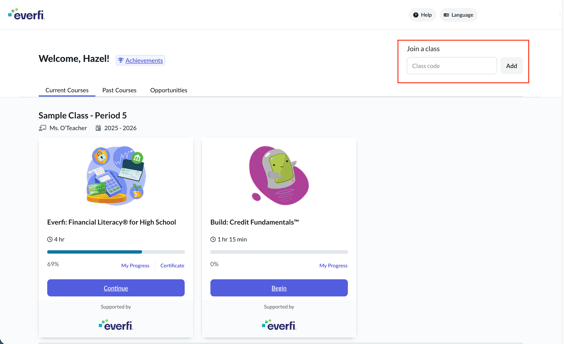
In some cases, your teacher may share a class registration code.
If you are new to Everfi:
- Go to the student login page
- Create your account
- Enter the class code when prompted
If you already have an account:
- Log in to your dashboard
- Enter the class code if prompted
- Your assigned course will appear
If you don’t see your course
If you think you should have access to a course but do not see it:
- Make sure you are logged in through the correct method (SSO or code)
- Check with your teacher to confirm the course is assigned
- Ask your teacher for a class code if one is required
Your teacher is the best person to help confirm what you should be working on.
Need help getting started
If you do not have an account yet, see: